AdsCrawl vs Browserless vs Playwright: Which Browser Automation Tool Wins?
Compare AdsCrawl, Browserless, and Playwright for browser automation, scraping, and AI agents. See which API, headless platform, or testing framework fits your workflow.
AdsCrawl vs Browserless vs Playwright: Choosing the Right Browser Automation Tool
Modern web automation demands more than just controlling a browser tab. Teams need to scrape data at scale, run reliable end-to-end tests, and give AI agents the ability to see and interact with web pages. Three tools frequently come up in these conversations: AdsCrawl, Browserless, and Playwright. Each solves a different piece of the puzzle, and picking the wrong one can lead to infrastructure headaches, flaky workflows, or unexpected costs.
This comparison breaks down what each tool actually does, where it shines, and how to match your use case to the right solution. We’ll look at architecture, developer experience, scaling behavior, and the specific scenarios where one option pulls ahead of the others.
What Each Tool Actually Does
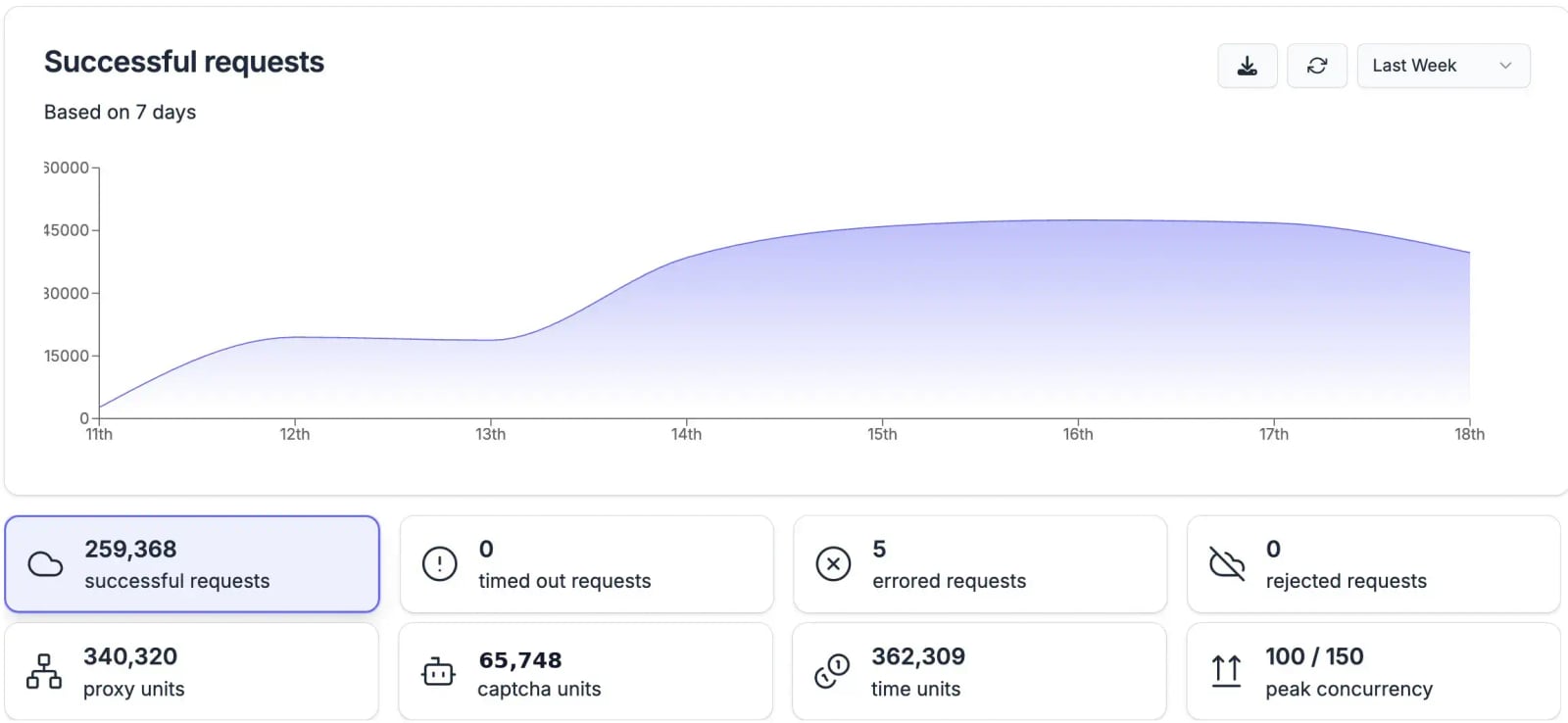
Browserless product interface.
Before diving into feature matrices, it’s worth clarifying what these three products are—and what they aren’t.
AdsCrawl is a browser automation and data extraction API platform. It provides real browser capabilities through a unified API, letting developers capture screenshots, extract HTML and Markdown, and control remote Chrome DevTools Protocol (CDP) sessions. It’s built for AI agents, monitoring, SEO, and automation workflows. The platform offers cloud browser sessions with fingerprint profiles, concurrent browser execution, and credit-based usage with a freemium model. Teams use AdsCrawl to collect public web pages at scale, validate page rendering states, and wrap repeatable web actions into reliable APIs. With dashboards for key management, usage tracking, and debugging, it integrates quickly via cURL, Node.js, and Python examples.
Browserless is a managed headless browser automation platform. It handles the infrastructure layer—scaling, health checks, security patches, and browser fleet management—so developers can focus on writing scripts rather than maintaining servers. It supports Puppeteer, Playwright, and MCP protocols, and offers features like stealth mode, CAPTCHA solving, session reconnects, and authenticated profiles. Over 10,000 paying customers and 160M+ Docker pulls speak to its maturity in production environments.
Playwright is an open-source end-to-end testing framework developed by Microsoft. It’s a library you install and run yourself, providing cross-browser automation across Chromium, Firefox, and WebKit. It excels at test reliability with auto-waiting, web-first assertions, and isolated browser contexts. It also offers a CLI for AI agent integration, an MCP server for tools like VS Code and Claude Desktop, and accessibility snapshots for deterministic agent interactions.
Architecture: API-First vs. Managed Infrastructure vs. Library
Playwright product interface.
The fundamental difference between these tools is where the browser runs and who manages it.
AdsCrawl: Unified API with Cloud Browser Sessions
AdsCrawl abstracts browser management behind a clean API. You send a request with a URL and parameters, and AdsCrawl spins up a real browser session in the cloud, executes your instructions, and returns structured data. There’s no need to install browsers, manage Docker containers, or worry about memory limits on your own machine.
This architecture is particularly valuable for teams that need browser capabilities inside serverless functions, AI agent pipelines, or lightweight backend services where running a full browser isn’t practical. The credit-based freemium model means you can start small and scale without provisioning infrastructure.
Browserless: Managed Infrastructure You Connect To
Browserless provides a remote browser endpoint that you connect to using standard libraries like Puppeteer or Playwright. You write your automation scripts as you normally would, but instead of launching a local browser, you connect to Browserless’s managed fleet via WebSocket. The platform handles scaling, concurrency, and browser lifecycle management.
This model gives you full control over your automation logic while offloading the operational burden. It’s a natural fit for teams already comfortable with Puppeteer or Playwright who want to move from local development to production without becoming browser infrastructure experts. For a deeper look at how Browserless performs in real-world scenarios, see our Browserless Review 2025: Headless Browser API Tested.
Playwright: Self-Managed Library
Playwright is a library you install via npm, pip, or other package managers. It downloads browser binaries and runs them on your own infrastructure—your laptop, CI runner, or cloud VM. You’re responsible for provisioning resources, managing concurrency, and keeping browsers updated.
This gives you complete control and zero per-request costs beyond your own compute, but it also means you own the operational complexity. Playwright’s built-in parallelism and sharding help with CI scaling, but you’ll still need to manage the underlying machines.
Developer Experience and Learning Curve
Collection and archiving.
Getting Started Quickly
AdsCrawl prioritizes speed of integration. With cURL, Node.js, and Python examples in the documentation, you can make your first API call in minutes. The dashboard provides key management, usage tracking, and debugging tools, which reduces the time spent figuring out why a request failed. For a step-by-step walkthrough, check out How to Use AdsCrawl: A Complete API Tutorial.
Browserless also offers a straightforward onboarding experience. After signing up, you get an API key and a WebSocket endpoint. If you already know Puppeteer or Playwright, switching to Browserless often requires changing just the connection string in your existing code.
Playwright has excellent documentation and a gentle learning curve for developers familiar with async/await patterns. The auto-waiting mechanism eliminates many common sources of flaky tests, and the codegen tool can record interactions to generate scripts. However, beginners may need time to understand concepts like browser contexts, locator strategies, and CI integration.
Debugging and Observability
AdsCrawl’s dashboard provides centralized visibility into requests, responses, and usage. This is helpful for teams that need to monitor automation workflows without building their own observability stack.
Browserless offers session recording and logs, letting you replay failed sessions to understand what went wrong. This is invaluable for debugging complex scraping workflows where a page might render differently on each attempt.
Playwright provides excellent local debugging tools, including the Playwright Inspector, trace viewer, and video recording. However, in production, you’ll need to set up your own logging and monitoring infrastructure.
Scaling and Infrastructure Considerations
Detection and association resistance.
Handling Concurrent Sessions
AdsCrawl supports concurrent browser execution natively. The platform manages session isolation and resource allocation, so you can run multiple browser sessions in parallel without worrying about memory contention or port conflicts.
Browserless is built for scale. It handles concurrency, health checks, and automatic scaling out of the box. The platform’s architecture is battle-tested with over 160M Docker pulls and a 99.9% uptime SLA, making it a reliable choice for production workloads that need to run hundreds or thousands of concurrent sessions.
Playwright can scale, but you’re responsible for the infrastructure. Its built-in parallelism and sharding work well for CI pipelines, but running hundreds of concurrent browser instances requires significant compute resources—each instance can consume 200-500MB of memory. Teams often pair Playwright with container orchestration platforms or cloud services to manage this at scale.
Anti-Detection and Stealth
AdsCrawl offers fingerprint profiles as part of its cloud browser sessions, helping automation blend in with regular traffic patterns. This is important for data collection workflows where sites may block obvious bot traffic.
Browserless includes stealth mode and CAPTCHA solving as built-in features. The platform applies various techniques to make headless browsers less detectable, which is critical for web scraping at scale.
Playwright itself doesn’t include anti-detection features, though you can configure it to appear more human-like. The framework’s focus is on testing your own applications, where stealth isn’t typically a concern. For scraping public websites, you’d need to add proxy rotation, fingerprint randomization, and other techniques yourself.
AI Agent Integration
All three tools position themselves for the growing AI agent market, but they approach it differently.
AdsCrawl is built with AI agents as a primary use case. Its API returns structured HTML and Markdown that LLMs can consume directly, and its CDP control allows agents to interact with pages programmatically. The platform’s design philosophy treats browser infrastructure as a utility for the AI era. If you’re building AI-powered web data pipelines, see How to Use AdsCrawl with ChatGPT for AI-Powered Web Data.
Browserless supports MCP (Model Context Protocol), allowing AI agents to control browsers through a standardized interface. This makes it compatible with a growing ecosystem of AI tools and frameworks.
Playwright offers a CLI designed for token-efficient AI agent integration, an MCP server for tools like VS Code and Claude Desktop, and accessibility snapshots that give agents a deterministic view of page structure. Microsoft’s investment in this area signals that Playwright will continue to evolve as a bridge between browsers and AI systems.
Pricing and Total Cost of Ownership
Free and Entry-Level Options
AdsCrawl uses a credit-based freemium model, letting you start without upfront costs and scale as your usage grows. This is attractive for teams that want to validate a use case before committing to a paid plan.
Browserless offers a free tier with up to 6 hours of usage, which is generous enough for evaluation and small projects. Paid plans unlock more concurrency and processing power.
Playwright is completely free and open-source. There are no usage limits or per-request fees. However, you pay for the infrastructure it runs on—CI minutes, cloud VMs, or on-premise servers—and the engineering time required to maintain it.
Cost at Scale
For high-volume production workloads, the cost equation shifts. Managed platforms like AdsCrawl and Browserless charge based on usage, which can become expensive at very high volumes but eliminates infrastructure management costs. Self-hosting Playwright has lower marginal costs per request but requires significant engineering investment in infrastructure, monitoring, and maintenance.
The right choice depends on your team’s composition. If you have dedicated DevOps resources and predictable workloads, self-hosting Playwright may be more economical. If you want to minimize operational overhead and scale elastically, a managed platform often delivers better total cost of ownership.
Use Case Mapping: Which Tool Fits Your Workflow?
Choose AdsCrawl When:
- You need a unified API that returns structured data (HTML, Markdown, screenshots) without writing browser automation code.
- You’re building AI agent pipelines that need to consume web content in LLM-friendly formats.
- You want cloud browser sessions with fingerprint profiles and concurrent execution without managing infrastructure.
- Your team prefers credit-based pricing with a freemium entry point and a dashboard for monitoring.
Choose Browserless When:
- You already use Puppeteer or Playwright and want to offload browser infrastructure management.
- You need production-grade scaling, health checks, and session recording without building it yourself.
- Stealth mode and CAPTCHA solving are critical to your scraping workflows.
- You want a single API endpoint that replaces multiple vendors for proxies, CAPTCHA solving, and compute.
Choose Playwright When:
- You’re building an end-to-end testing suite for your own web application.
- You need cross-browser testing across Chromium, Firefox, and WebKit.
- You have the infrastructure expertise to manage browser instances at scale.
- You want complete control over your automation stack with no vendor dependencies.
- Your team values open-source transparency and community-driven development.
Comparison Table
| Criteria | AdsCrawl | Browserless | Playwright |
|---|---|---|---|
| Type | Browser automation API platform | Managed headless browser infrastructure | Open-source testing framework |
| Browser Management | Fully managed cloud browsers | Managed remote browsers | Self-managed |
| Primary Use Cases | AI agents, data extraction, monitoring, SEO | Web scraping, testing, PDF generation, AI agents | End-to-end testing, web scraping, AI agent control |
| Protocol Support | Unified API, CDP | Puppeteer, Playwright, MCP | Native Playwright API, MCP server |
| Anti-Detection | Fingerprint profiles | Stealth mode, CAPTCHA solving | Manual configuration required |
| Scaling Model | Concurrent cloud sessions, credit-based | Automatic scaling, concurrency management | Self-managed parallelism and sharding |
| Pricing | Credit-based freemium | Free tier, usage-based paid plans | Free and open-source |
| AI Agent Features | Structured HTML/Markdown output, CDP control | MCP protocol support | CLI for AI agents, MCP server, accessibility snapshots |
| Languages | cURL, Node.js, Python | Any language via WebSocket (Puppeteer/Playwright clients) | Node.js, Python, Java, .NET |
Related reading
- AdsCrawl vs Scrapfly vs axiom.ai: Which Web Automation API Wins? - Compare AdsCrawl, Scrapfly, and axiom.ai for browser automation, scraping, and AI agents. See which API, cloud browser, or no-code bot fits your workflow.
- GoLogin Review 2025: Anti-Detect Browser Tested - Evidence-based GoLogin review covering fingerprinting, multi-account management, pricing, security concerns, and ideal use cases for marketers and e-commerce.
Sources and further reading
- Playwright vs Puppeteer | Which one to choose for browser automation? - In this article, we'll dive deeper into browser automation and what framework you should use: playwright vs puppeteer.
- Browserless vs Playwright: Browser Agents Comparison - Side-by-side comparison of Browserless and Playwright including features, pricing, pros, and cons.
- Puppeteer vs Playwright in 2026: It's not even close. - Enjoy the videos and music you love, upload original content, and share it all with friends, family, and the world on YouTube.
Frequently Asked Questions
Can I use Playwright with Browserless?
Yes. Browserless provides a Playwright-compatible endpoint. You can write your automation scripts using the Playwright library and connect to Browserless’s managed browser fleet by changing the WebSocket endpoint in your connection code. This gives you Playwright’s API with Browserless’s infrastructure management.
Is AdsCrawl a replacement for Playwright?
Not exactly. AdsCrawl is an API platform that provides browser capabilities without requiring you to write Playwright or Puppeteer scripts. It’s designed for teams that want to consume browser-rendered data through a simple API. Playwright is a library for programmatic browser control. They serve different developer personas and workflows.
Which tool is best for web scraping at scale?
Browserless is purpose-built for web scraping at scale, with built-in stealth mode, CAPTCHA solving, and automatic scaling. AdsCrawl is also well-suited for scraping workflows, especially when you need structured output formats like Markdown. Playwright can handle scraping but requires you to build and maintain the supporting infrastructure yourself.
Do I need to know how to code to use these tools?
AdsCrawl’s API can be called with simple cURL commands, making it accessible to users with minimal programming experience. Browserless and Playwright require proficiency in JavaScript, Python, or another supported language to write automation scripts.
How do these tools handle website blocking?
AdsCrawl uses fingerprint profiles to reduce detection. Browserless includes stealth mode and CAPTCHA solving as first-class features. Playwright doesn’t include anti-detection features by default; you’ll need to implement proxy rotation, header management, and other techniques yourself.
Making the Final Decision
The choice between AdsCrawl, Browserless, and Playwright ultimately depends on your team’s skills, infrastructure preferences, and primary use case.
If you’re building AI agents or need a simple API for browser-rendered data, AdsCrawl’s unified approach reduces integration time and operational complexity. If you’re an experienced Puppeteer or Playwright user who wants to stop managing browser infrastructure, Browserless offers a mature, battle-tested platform with the features production scraping demands. If you’re focused on testing your own applications and have the DevOps resources to manage infrastructure, Playwright’s open-source framework gives you unmatched control and flexibility.
Many teams end up using more than one of these tools. A common pattern is using Playwright for local development and CI testing, Browserless for production scraping workloads, and AdsCrawl for AI agent pipelines that need structured web data. Understanding the strengths of each option lets you build a browser automation stack that matches your actual needs rather than forcing one tool to do everything.
For more comparisons that include AdsCrawl alongside other browser automation tools, see our AdsCrawl vs Browserless vs axiom.ai breakdown or the AdsCrawl vs Scrapfly vs Browserless API Showdown.