AdsCrawl vs Browserless: Which Browser API Wins in 2026?
Compare AdsCrawl and Browserless for browser automation, data extraction, and AI agents. See which platform offers better CDP control, pricing, and anti-detection.
AdsCrawl vs Browserless: Which Browser API Wins in 2026?
Choosing between AdsCrawl and Browserless isn't just about picking a headless browser service—it's about deciding how much control, scalability, and AI readiness you need from your browser infrastructure. Both platforms let you run remote browsers without managing your own Chrome clusters, but they take fundamentally different approaches to sessions, data extraction, and anti-detection. This guide compares AdsCrawl's real browser API with Browserless's managed headless platform, so you can match the tool to your automation, scraping, or AI agent workflow.
What Is AdsCrawl?
AdsCrawl is a browser automation and data extraction API platform built for the AI era. Instead of just offering headless Chrome endpoints, it provides a unified API that gives developers direct access to real browser capabilities—screenshots, HTML and Markdown extraction, and full Chrome DevTools Protocol (CDP) control. You're not limited to a fixed set of REST endpoints; you can drive the browser exactly how you need to.
The platform centers on cloud browser sessions with fingerprint profiles, concurrent execution, and credit-based usage under a freemium model. Teams use AdsCrawl for collecting public web pages at scale, validating page rendering states, and wrapping repeatable web actions into reliable APIs. A built-in dashboard handles key management, usage tracking, and debugging, while quick-start examples in cURL, Node.js, and Python make integration straightforward. AdsCrawl positions itself as browser infrastructure for AI agents, cross-border commerce, growth, data, and automation scenarios—not just another scraping tool.
What Is Browserless?
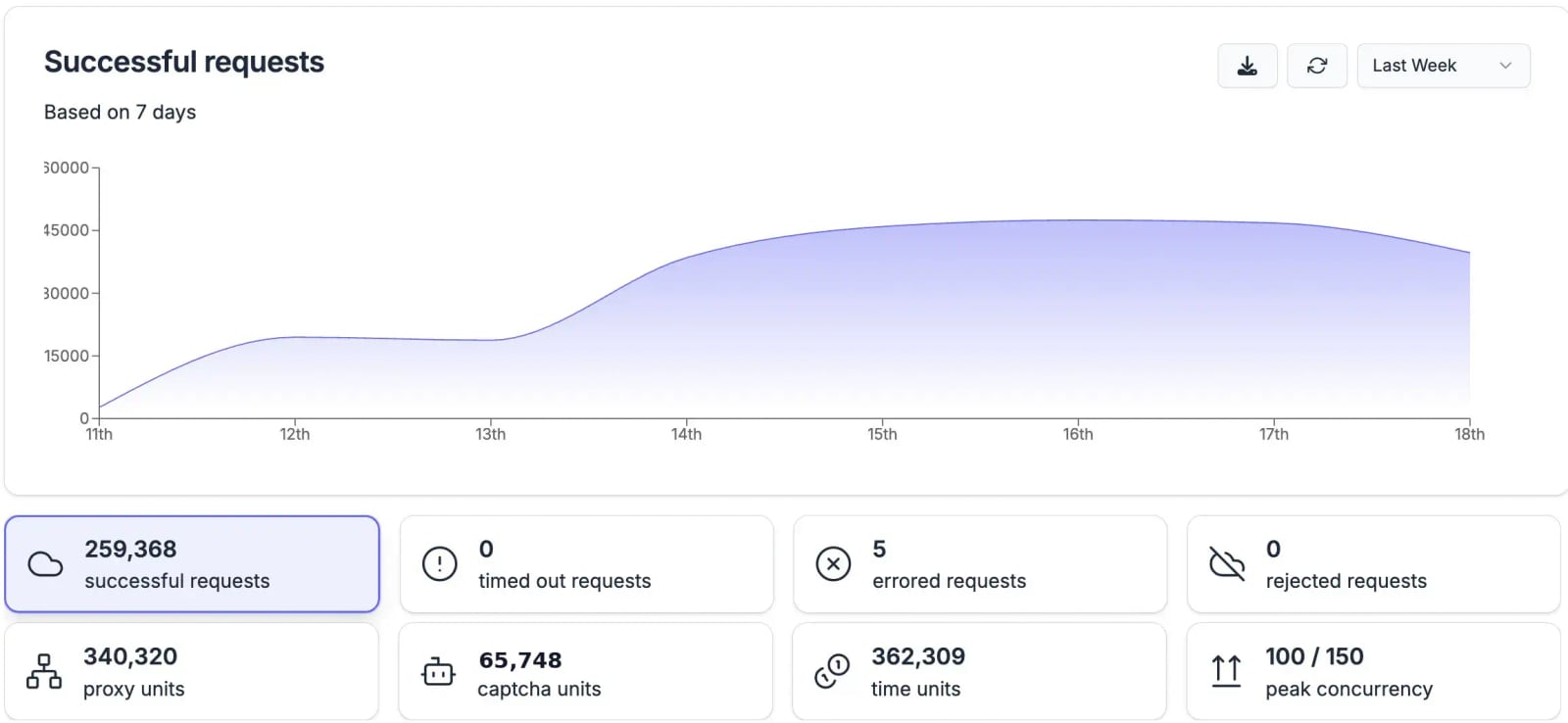
Browserless product interface.
Browserless is a managed headless browser platform that exposes Chrome and other browsers over WebSocket CDP endpoints and REST APIs. It's designed to remove the operational burden of running browser clusters yourself. You connect with Puppeteer or Playwright over a wss:// endpoint, and Browserless handles scaling, health checks, and security patches behind the scenes.
Key features include REST APIs for common tasks like /content, /screenshot, /scrape, and /unblock, plus BrowserQL—a GraphQL-based automation API with stealth primitives. The platform supports stealth mode, CAPTCHA solving, session reconnects, and authenticated profiles. With over 160 million Docker pulls and 10,000+ paying customers, Browserless offers both cloud and self-hosted options, including an open-source Docker image and commercial licenses for enterprise deployments. Pricing is based on compute units and concurrency, with a free tier of 1,000 units.
Head-to-Head Comparison: AdsCrawl vs Browserless
Browser Session Control and CDP Access
AdsCrawl gives you full remote Chrome DevTools Protocol sessions. This means you can control every aspect of the browser—network conditions, JavaScript execution, DOM manipulation—directly through the same protocol that powers Puppeteer and Playwright. For teams building custom automation logic or AI agents that need fine-grained browser control, this direct CDP access eliminates abstraction layers that can limit what you can do.
Browserless also exposes CDP endpoints, letting you connect with Puppeteer or Playwright by swapping your local launch call for a remote WebSocket connection. You keep control of selectors, navigation, and browser state. However, the platform abstracts some session management behind its own queueing and concurrency handling. For standard automation scripts, this works well; for deeply customized browser interactions, you're still working within the boundaries of the Puppeteer or Playwright API rather than raw CDP commands.
Advantage: AdsCrawl for teams that need unrestricted CDP access. Direct protocol control means you can implement custom stealth techniques, manipulate browser internals, and build workflows that go beyond what higher-level APIs expose.
Data Extraction Capabilities
AdsCrawl treats data extraction as a first-class feature. The API returns HTML, Markdown, and screenshots from real browser sessions, giving you structured outputs without post-processing. Because sessions run in real cloud browsers with fingerprint profiles, you capture content exactly as users see it—including JavaScript-rendered pages that static HTTP clients miss. The platform is built for collecting public web data at scale, with dashboards that track usage and success rates across extraction jobs.
Browserless provides REST endpoints for content, screenshots, and PDFs, plus a /scrape endpoint with built-in JavaScript rendering. BrowserQL adds a GraphQL layer that can extract structured data from pages. However, Browserless is fundamentally a browser platform first and an extraction tool second. You'll often need to write your own parsing logic or combine it with separate extraction libraries. The platform's pricing model—charging per 30-second unit plus additional units for proxy bandwidth and CAPTCHA solves—can make large-scale extraction projects expensive compared to request-based pricing.
Advantage: AdsCrawl for extraction-focused workflows. Built-in Markdown and HTML output, combined with credit-based pricing that aligns with extraction volume rather than browser time, makes it more cost-predictable for data collection at scale.
AI Agent and Automation Workflows
AdsCrawl was designed with AI agents in mind. The platform provides browser infrastructure that AI applications can control programmatically—capturing screenshots for vision models, extracting clean Markdown for LLM processing, and executing multi-step web actions through API calls. The credit-based freemium model lets you experiment without upfront costs, then scale as your agent workflows grow.
Browserless supports AI agents through Puppeteer, Playwright, and MCP protocol connections. Its session reconnect feature helps long-running agent tasks survive network interruptions. However, the platform's primary design centers on traditional browser automation rather than AI-native workflows. You'll need to build the agent orchestration layer yourself on top of the browser infrastructure.
Advantage: AdsCrawl for AI-native applications. Purpose-built features like Markdown extraction and screenshot capture align directly with LLM and vision model input requirements, reducing the glue code you need to write.
Anti-Detection and Stealth
AdsCrawl provides fingerprint profiles that make cloud browser sessions appear as real user browsers. By controlling browser fingerprints at the session level, you can maintain consistent identities across multiple requests—important for sites that track returning visitors. The platform's real browser approach means JavaScript challenges, WebGL fingerprinting, and other advanced detection techniques see genuine browser behavior rather than headless-mode artifacts.
Browserless offers a multi-layered stealth stack: stealth routes, CAPTCHA solving, human-like input simulation, residential proxy support, and fingerprint randomization. BrowserQL wraps these features into a GraphQL API with bot detection bypass primitives. However, independent benchmarks suggest that out-of-box success rates on heavily protected sites can vary, and the credit multipliers for proxy bandwidth (6 units per MB) and CAPTCHA solves (10 units per solve) can inflate costs on tough targets.
Advantage: AdsCrawl for consistent, predictable anti-detection. Session-based fingerprint profiles give you control over browser identity without per-action surcharges, making stealth more cost-effective at scale.
Pricing and Scalability
AdsCrawl uses a credit-based freemium model. You start with free credits, then pay for what you use as you scale. Credits cover browser sessions, extraction, and CDP control in a unified consumption model. Concurrent browser execution lets you run multiple sessions in parallel, and the dashboard shows real-time usage so you never lose track of costs.
Browserless charges based on compute units and concurrency limits. The free tier includes 1,000 units, and paid plans start at $140/month for the Starter tier with 180,000 units. However, time-based billing means slow page loads, timeouts, and extended rendering all consume units. Additional charges apply for proxy bandwidth (6 units per MB) and CAPTCHA solving (10 units per solve), which can make costs unpredictable on complex targets.
Advantage: AdsCrawl for cost predictability and entry price. The freemium model with credit-based usage lowers the barrier to entry, and unified credits avoid the surprise multipliers that come with time-based billing.
Deployment Flexibility
AdsCrawl is a cloud-native platform with no self-hosted option. You integrate via API and manage everything through the dashboard. For teams that want zero infrastructure overhead, this is ideal—but if data privacy requirements demand on-premise deployment, AdsCrawl may not fit.
Browserless offers both cloud and self-hosted options. The open-source Docker image lets you run Browserless in your own VPC, and commercial licenses provide enterprise-grade self-hosted deployments with support. This flexibility is critical for organizations with strict data residency or security policies.
Advantage: Browserless for teams that need self-hosted or hybrid deployments. If running browsers inside your own infrastructure is a hard requirement, Browserless is the clear choice.
When to Choose AdsCrawl
AdsCrawl fits teams that want a unified browser API without managing infrastructure. Choose it when:
- You need direct Chrome DevTools Protocol access for custom browser control.
- Your workflow centers on data extraction—HTML, Markdown, and screenshots from real browser sessions.
- You're building AI agents that consume web content programmatically.
- Predictable, credit-based pricing matters more than self-hosted deployment options.
- You want to start with a free tier and scale without upfront commitments.
For a broader look at how AdsCrawl compares to other tools, see our AdsCrawl vs Selenium vs Playwright comparison and the Top 10 Browser Automation & Data Extraction API Platforms.
When to Choose Browserless
Browserless excels when infrastructure flexibility and existing Puppeteer/Playwright compatibility are priorities. Choose it when:
- You need self-hosted or hybrid deployment options for data privacy.
- Your team already has Puppeteer or Playwright scripts and wants a drop-in remote browser cluster.
- You value REST APIs for common tasks like screenshots and PDFs alongside CDP access.
- Enterprise features like SOC 2 Type II, SSO, and private deployments are requirements.
- You prefer a platform with a large open-source community and Docker-based deployment.
Migration Path: Switching from Browserless to AdsCrawl
If you're currently using Browserless and considering AdsCrawl, the migration is straightforward. Both platforms support standard Puppeteer and Playwright connections, so your existing scripts need minimal changes. The main adjustments involve:
- Authentication: Swap Browserless tokens for AdsCrawl API keys.
- Endpoint URLs: Update WebSocket endpoints to AdsCrawl's cloud browser addresses.
- Extraction logic: Replace post-processing code with AdsCrawl's built-in Markdown and HTML extraction when possible.
- Cost monitoring: Switch from tracking time-based units to monitoring credit consumption in the AdsCrawl dashboard.
Most teams complete the migration in a few hours. Check our Scrapfly API guide for examples of how cloud browser APIs handle extraction workflows.
Related reading
- AdsCrawl vs ScrapingBee vs Playwright: Which Tool Wins? - Compare AdsCrawl, ScrapingBee, and Playwright for browser automation, scraping, and testing. See which API, framework, or cloud browser fits your 2026 workflow.
- AdsCrawl vs Selenium: Cloud API vs Framework in 2026 - Compare AdsCrawl's cloud browser API with Selenium's automation framework. See which fits AI agents, scraping, and testing with less maintenance.
- axiom.ai Review: No-Code Browser Automation That Actually Works? - In-depth axiom.ai review: test its no-code, code, and AI bot builder, cloud vs local run, pricing signals, and real use cases. See if it fits your workflow.
Sources and further reading
- Browserless vs. Browserbase: The Best Headless Browser - Read our comparison of Browserless vs. Browserbase to learn which is the best headless browser, web scraper, PDF capture tool, and more.
- Browserless alternative that actually works? Try Scrapfly - Browserless alternative that works on protected sites. 98% success rate. Get 1,000 FREE API credits and start scraping today.
- Browserless Outperforms Browserbase in Head-to- ... - Raising $67.5M doesn
Frequently Asked Questions
Does AdsCrawl support Puppeteer and Playwright?
Yes. AdsCrawl provides Chrome DevTools Protocol endpoints that work with both Puppeteer and Playwright. You connect using standard CDP WebSocket URLs, just as you would with any remote browser service.
Is Browserless cheaper than AdsCrawl?
It depends on your workload. Browserless charges per 30-second unit with additional fees for proxy bandwidth and CAPTCHA solving, which can add up on slow or protected pages. AdsCrawl uses credit-based pricing that aligns with extraction volume rather than browser time, often making it more predictable for data collection at scale. Browserless has a free tier of 1,000 units; AdsCrawl offers a freemium model with free credits to start.
Can I self-host AdsCrawl?
No. AdsCrawl is a cloud-native platform with no self-hosted option. If you need on-premise deployment, Browserless offers Docker-based self-hosted solutions with commercial licensing.
Which platform handles anti-bot detection better?
Both platforms offer anti-detection features. AdsCrawl uses fingerprint profiles to make cloud browser sessions appear as real user browsers. Browserless combines stealth routes, CAPTCHA solving, and proxy rotation. For consistent success on heavily protected sites, AdsCrawl's session-based fingerprint approach avoids the per-action surcharges that Browserless applies to proxy and CAPTCHA usage.
Can I use these platforms for AI agent workflows?
Yes, both support AI agent use cases. AdsCrawl is purpose-built for AI agents, with Markdown extraction and screenshot capture designed for LLM and vision model input. Browserless supports AI agents through Puppeteer, Playwright, and MCP protocol connections, with session reconnect for long-running tasks.
Final Verdict: AdsCrawl or Browserless?
AdsCrawl and Browserless serve different priorities within the browser automation space. AdsCrawl wins on direct CDP control, extraction-focused features, AI agent readiness, and predictable credit-based pricing. Browserless wins on deployment flexibility, self-hosted options, enterprise compliance features, and a mature open-source ecosystem.
For teams building data extraction pipelines, AI agents, or automation workflows that need real browser capabilities without infrastructure overhead, AdsCrawl provides the more integrated, cost-predictable platform. For organizations that require self-hosted deployment or have existing Puppeteer/Playwright investments they want to lift-and-shift with minimal changes, Browserless remains a strong choice.
Still comparing options? Read our AdsCrawl vs ScrapingBee comparison to see how real browser sessions stack up against traditional scraping APIs.